GIF to Sprite Sheet
Lay out every frame of an animated GIF on one PNG sprite sheet, with the columns, rows and padding you want, plus JSON frame data. Or go the other way: cut a sprite sheet into frames and play them as a GIF.
- 1Choose a file
- 2Set the grid
- 3Download
1Choose a GIF
or drop a GIF here, or paste one with Ctrl/Cmd+V
Your files never leave your device. They are read and converted in your browser. We count visits and finished downloads (tool name only) with analytics that sets no cookies.
2Set the grid
1Choose a sprite sheet
or drop a PNG, JPG, WebP or GIF here, or paste one with Ctrl/Cmd+V
Your files never leave your device. They are read and converted in your browser. We count visits and finished downloads (tool name only) with analytics that sets no cookies.
2Set the grid
Before and after
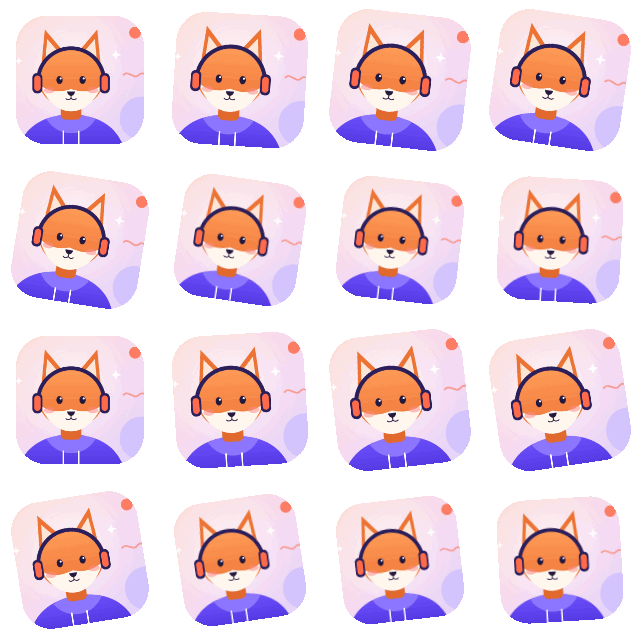
The example GIF and the sprite sheet this tool makes from it with the default 4 × 4 grid. The Sprite sheet to GIF tab turns that sheet back into the same animation.

How to turn a GIF into a sprite sheet
- Choose your GIF. Drop it on the box above, paste it, or press Choose GIF. It stays on your device.
- Set the grid. Pick the number of columns (the rows follow), or put every frame in one row or one column.
- Add padding if you need it. Padding puts empty pixels between frames, and optionally around the outside, which helps stop neighbouring frames bleeding into each other when a game engine scales the sheet.
- Download. You get a PNG sheet. Download JSON frame data too if your code needs each frame's position and delay.
How to turn a sprite sheet into a GIF
- Open the Sprite sheet to GIF tab and choose your sheet: PNG, JPG, WebP or GIF.
- Set the columns and rows. Purple lines on the sheet show where the frames are cut. Add the space between frames and the margin at the edge if your sheet has them.
- Set the speed in frames per second, then download the GIF.
What is in the files
- PNG sheet: every frame as a full picture, the size of the GIF, in reading order (left to right, then top to bottom). Transparent parts of the GIF stay transparent unless you fill the background.
- JSON frame data: a
framesobject with each frame'sx,y,wandhon the sheet and itsdurationin milliseconds (the delay stored in the GIF), plus ametaobject with the sheet size, columns, rows and loop count. - GIF from a sheet: a GIF stores delays in hundredths of a second, so the speed is rounded to that. Browsers play a delay of 0.01 s or less as 0.1 s, so the fastest speed here is 50 frames per second (0.02 s per frame). A GIF also allows at most 256 colours per frame, so a frame with more colours has them reduced, and partly transparent pixels become fully clear or solid.
FAQ
How do I convert a GIF to a sprite sheet?
Choose your GIF above, set the columns (or pick One row), then press Download PNG sheet. Every frame is placed on the sheet in order, at the GIF's full size.
How many columns should my sprite sheet have?
Whatever your engine or code expects. By default the tool picks a near-square grid, which keeps the sheet compact. One row or one column is one click away under Layout.
What does padding do?
It adds empty pixels between frames, and around the outside edge if you tick that box. Some engines sample a little past a frame's edge when scaling or filtering, and padding keeps the next frame from showing at the border.
Does the sprite sheet keep the GIF's timing?
A PNG has no timing, so the sheet alone does not. Download the JSON frame data: it lists each frame's duration in milliseconds, taken from the delay stored in the GIF.
How do I turn a sprite sheet into a GIF?
Open the Sprite sheet to GIF tab, choose your sheet, set the columns, rows and any spacing so the purple grid lines sit between the frames, set the frames per second, and download.
Why are my frames cut in the wrong place?
The columns, rows, spacing or margin don't match the sheet. Each frame's width is the sheet width, minus the margins and spaces, divided by the columns. The tool warns you when that is not a whole number of pixels, which usually means one of the numbers is off.
Does this tool upload my files?
No. Your files are read and converted by your browser on your own device and are never sent to a server. You can check: open your browser's developer tools, go to the Network tab, and use the tool. No request carries your file. The page counts visits and finished downloads (tool name only) with analytics that sets no cookies, and no file data is ever sent (see privacy).
More free tools
- GIF Speed ChangerSpeed up or slow down a GIF
- Video Frame ExtractorSave a frame from a video or GIF
- Grid Drawing ToolAdd a drawing grid to a photo
- Icon ConverterPNG or JPG to a multi-size .ico
- Twitch Emote ResizerAnimated GIF emotes, each size-checked
- Placeholder Image GeneratorAny size, colour and text