CRT Filter & Halftone Maker
Turn any picture into an old CRT screen or a halftone print. Add VHS wobble, film grain, noise or blocky JPEG artifacts on top. Every filter has its own intensity, and you can stack as many as you like.
- 1Choose an image
- 2Pick filters
- 3Download
1Choose an image
or drop an image here, or paste one with Ctrl/Cmd+V
Your image never leaves your device. The filters run in your browser. We count visits and finished downloads (tool name only) with analytics that sets no cookies.
2Pick filters
Before and after
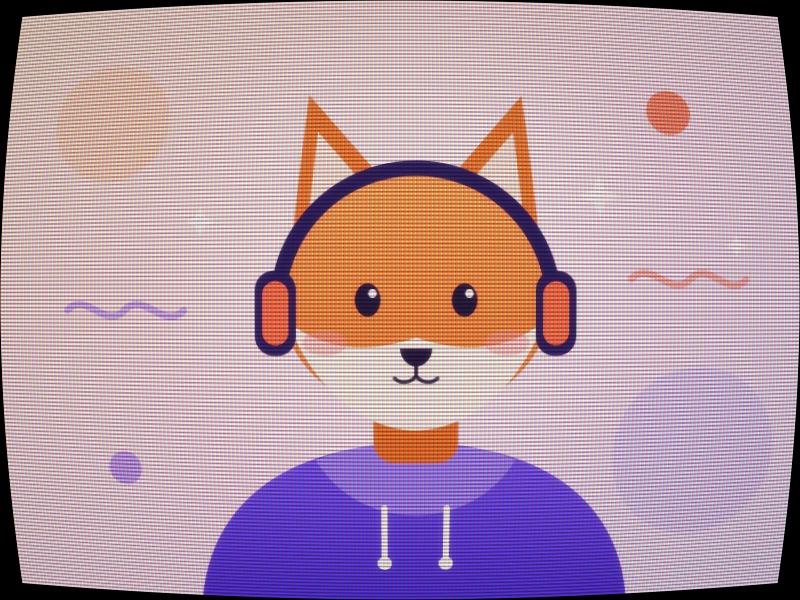
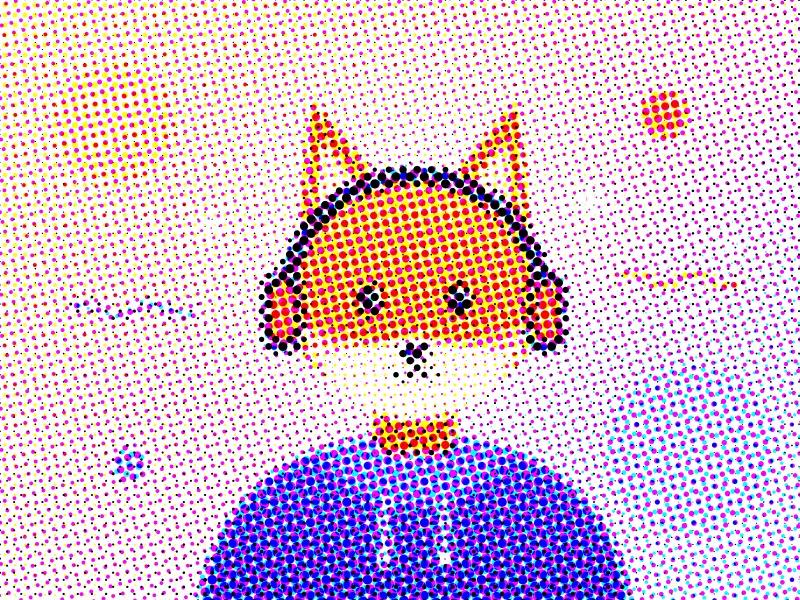
The example image, changed with this tool. Middle: the CRT screen quick look. Right: the CMYK halftone quick look.

How to add a CRT filter or make a halftone
- Choose an image (JPG, PNG, WebP or GIF), or press Try with an example. The CRT filter is on to start with.
- Pick a quick look, or tick the filters you want and set each one's intensity. Ticked filters stack.
- Compare with the before/after slider, or drag across the picture.
- Choose PNG or JPG and press Download. The download is made at full size with the same settings.
What each filter does
- Halftone rebuilds the picture from round dots on a rotated grid, like newspaper or comic printing. Darker areas get bigger dots. Mono uses black ink; CMYK uses four dot screens (cyan, magenta, yellow, black) at the classic angles 15°, 75°, 0° and 45° when Angle is 45°.
- CRT screen imitates an old tube TV or monitor: dark gaps between scanlines, red, green and blue vertical stripes (an aperture-grille style mask), bulging screen curvature with dark rounded corners, and a soft glow around bright parts.
- VHS shifts lines sideways in a slow wobble, adds a tracking band near the bottom, smears and offsets the color to the right, and lifts the blacks, like a worn videotape.
- Film grain adds soft grey grain that is strongest in the midtones. Grain size sets how coarse it is.
- Noise adds random per-pixel noise, in color like a digital camera at high ISO, or grey with Mono noise ticked.
- JPEG artifacts runs the lossy steps of JPEG compression: color is split into brightness and color, color is halved in each direction, and 8 × 8 blocks are converted with a DCT and rounded with the standard JPEG tables. Higher intensity means a lower JPEG quality, down to quality 1.
- Filters always run in this order: halftone, VHS, CRT, film grain, noise, JPEG artifacts. Dot rows, scanlines and grain are measured against the picture's height, so the download looks like the preview. JPEG blocks and noise specks are per pixel, so they look finer on a big download.
FAQ
How do I put a CRT filter on a picture?
Choose your picture above. The CRT filter is already on. Set the scanline count, scanline darkness, RGB mask, curvature and glow, or lower Intensity to blend it with the original. Then press Download.
How do I make a halftone image?
Press Mono halftone or CMYK halftone, or tick Use halftone. Fewer rows of dots means bigger dots. Angle turns the dot grid. Download a PNG to keep the dot edges clean.
Can I use more than one filter?
Yes. Tick as many as you want; each has its own intensity. For example, VHS plus CRT looks like a tape played on an old TV, and film grain plus JPEG artifacts looks like an old, re-saved photo.
Are the JPEG artifacts real JPEG compression?
They come from the same lossy steps as baseline JPEG: 4:2:0 color subsampling, the 8 × 8 DCT and quantization with the standard tables scaled to the chosen quality. The lossless packing step that JPEG adds afterwards does not change the pixels, so it is left out. Download as PNG so no second round of JPEG compression is added on top.
Is this the same as a CRT shader for games?
No. This tool changes still pictures. It does not run on live game or emulator output.
Does it work on animated GIFs?
Not as animations. A GIF opens as one still frame, and the download is a still PNG or JPG.
Is it free? Is there a watermark?
It is free, with no sign-up and no watermark. The download is the same size as your image unless you pick a smaller Size (very large images are worked on at 4096 px on the longest side).
Does this tool upload my image?
No. The picture is read, filtered and saved by your browser on your own device. Your image is never sent to a server. You can check: open your browser's developer tools, go to the Network tab, and use the tool. No request carries your image. The page counts visits and finished downloads (tool name only) with analytics that sets no cookies, and no file data is ever sent (see privacy).